Frontend, Backend, and Database: How They Work Together

What’s the question that I bear in mind?
How do frontend, backend and database interact with each other?
Preface
Have you ever wondered how websites like Facebook remember your profile or show personalized content every time you visit? This magic happens thanks to the seamless interaction between the frontend, backend, and database.
As I dive deeper into programming, I’ve realized that the more tools I learn, the more confused I become. Before joining a Bootcamp, I was introduced to tools like React, Node.js, and MongoDB. However, during the Bootcamp, I switched to using Ruby on Rails, which integrates an SQL database. This made me wonder: What does each tool really represent, and how do they work together?
Structure
To understand this, let’s start with a simple breakdown of these tools and their roles.
How do these layers work together?
Below is a diagram to visualize how the frontend, backend, and database connect:
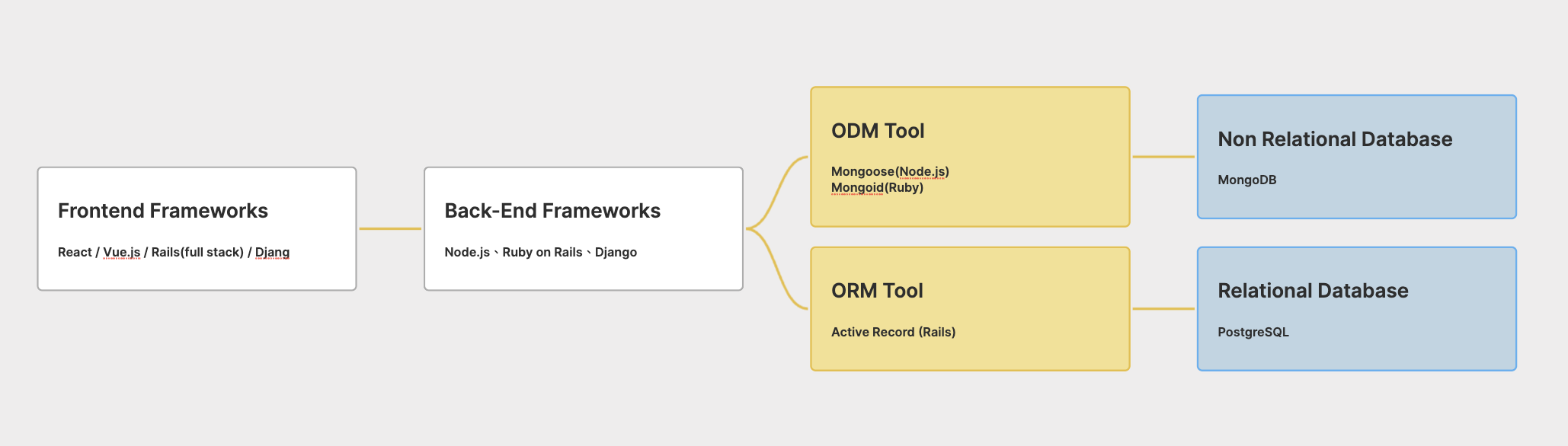
Frontend Frameworks
The frontend is what users see and interact with on a website. It handles the visual elements, such as buttons, menus, and forms. For example:
- React and Vue.js are popular frontend libraries that make building user interfaces easier.
- Think of the frontend as the restaurant menu that customers view—it presents information in a clear and user-friendly way.
Backend Frameworks
The backend is like the restaurant kitchen—it processes user requests and serves the necessary information. It’s responsible for managing logic, connecting to databases, and delivering data to the frontend.
Examples of backend frameworks include:
- Node.js: Often paired with React for modern web applications.
- Ruby on Rails: A powerful framework that includes tools for database management.
- Django: A robust backend framework built with Python.
Database
The database is where all the data lives. Imagine it as the restaurant's inventory system—it keeps track of everything, like user information, orders, or products. Databases come in two main types:
1. Relational Databases (SQL Databases)
Relational databases organize data in tables (rows and columns). They are structured and best suited for applications requiring clear relationships between data points.
- Definition: Data is stored in a tabular format with a fixed schema, and relationships between tables are explicitly defined.
- Key Characteristics:
- Use SQL (Structured Query Language) for queries and operations.
- Adhere to ACID properties, ensuring data consistency and reliability.
- Support strong relationships between tables using techniques like JOIN operations.
- Examples:
- PostgreSQL, MySQL, SQLite, Microsoft SQL Server, Oracle Database.
- Use Cases:
- Applications like banking systems, e-commerce platforms, and inventory management.
2. Non-Relational Databases (NoSQL Databases)
Non-relational databases are more flexible and suitable for storing unstructured or semi-structured data. They don’t rely on tables and are designed for scalability.
- Definition: Data is stored in formats like JSON or key-value pairs, allowing dynamic and flexible structures.
- Key Characteristics:
- No fixed schema, making them highly adaptable.
- Focus on horizontal scalability (adding more servers).
- Optimized for fast read/write operations.
- Types:
- Document-Oriented: Store data as JSON documents (e.g., MongoDB, CouchDB).
- Key-Value Stores: Use key-value pairs (e.g., Redis, DynamoDB).
- Wide-Column Stores: Organize data by columns instead of rows (e.g., Cassandra, HBase).
- Graph Databases: Specialized for relationships between data points (e.g., Neo4j, ArangoDB).
- Use Cases:
- Real-time analytics, social media, IoT, and log processing.
Can we directly manage database through backend?
Yes, but it’s not always practical. This is where ORM and ODM tools come in handy—they act as assistants that simplify database management.
1. ORM (Object-Relational Mapping)
ORM tools are designed for relational databases and help developers interact with data programmatically, without writing raw SQL.
- Definition: Maps database tables to classes and rows to objects.
- Key Features:
- Simplifies database operations (CRUD).
- Supports relationships (e.g.,
has_many,belongs_to). - Handles schema migrations and validations programmatically.
- Examples:
- Active Record (Ruby on Rails)
- SQLAlchemy (Python)
- Sequelize (Node.js)
- Hibernate (Java)
- Code Example (Active Record):
# Example: Creating a new user in Rails
user = User.create(name: "Alice", email: "alice@example.com")
puts user.name  # Output: Alice
2. ODM (Object-Document Mapping)
ODM tools are like ORM, but they are specifically designed for NoSQL databases, making it easier to work with dynamic, document-based data.
- Definition: Maps JSON-like documents to objects in code.
- Key Features:
- Supports nested and flexible schemas.
- Simplifies CRUD operations.
- Abstracts database queries into object manipulation.
- Examples:
- Mongoose (Node.js)
- Mongoid (Ruby)
- Morphia (Java)
- Code Example (Mongoose):
// Example: Creating a new user with Mongoose
const mongoose = require('mongoose');
const userSchema = new mongoose.Schema({ name: String, email: String });
const User = mongoose.model('User', userSchema);
User.create({ name: "Alice", email: "alice@example.com" });
Conclusion
Understanding how the frontend, backend, and database work together is key to building web applications. Frontend frameworks like React or Vue.js focus on user interfaces. Backend frameworks like Rails or Node.js handle logic and interactions, while databases store the information.
Take it a step further—experiment with different combinations of tools. Try using React + Node.js + MongoDB for a modern stack, or explore Rails + PostgreSQL to see how relational databases work. By practicing, you’ll better grasp these concepts and become confident in managing them!
![[JS] What are reference types?](/content/images/size/w720/2025/02/What-is-Work-Life-Balance.png)
Comments ()